 Mantys Core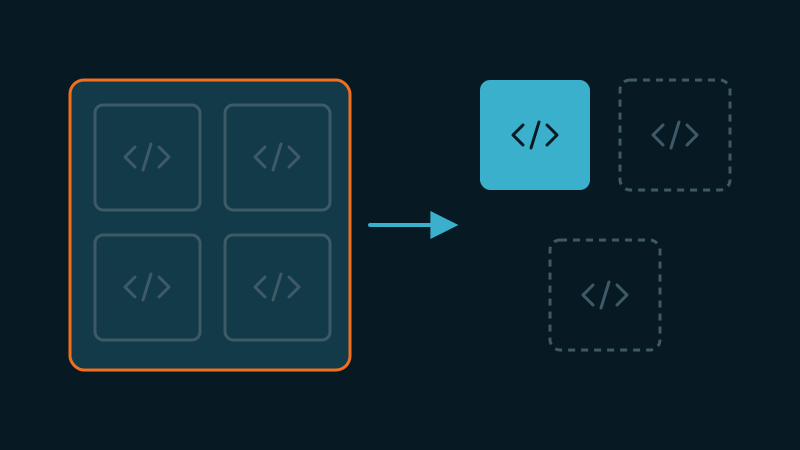
We talk a lot about cache plugins, CDNs, images in WebP. We rarely talk about the decision, upstream of all of them, that decides the rest: the theme. Before a single line of content, your theme sets what a browser will have to download, parse, compile and execute to paint the page. And among all its technical choices, one weighs more than the others on speed: the way it ships its JavaScript.
There are two families. Themes that split their code into small pieces loaded on demand, and themes that pile everything into one block, the famous main.js, theme.js or bundle.min.js that drives the menu, the slider, the lightbox, the tabs, the forms, the scroll animations and the AJAX calls. This second family locks you into a low performance ceiling. Here is why, and how to catch it before you commit.
Fine optimization means being able to split
A good front-end optimization is never a single switch. It is surgical work: keep what is visible immediately, push back the rest, remove what is not used at all. Concretely, on a well-optimized page we want to be able to:
- Load the strict minimum so the top of the page (the ATF, above the fold) is painted and interactive as fast as possible.
- Delay everything that is not needed right away (a footer carousel, a chat, a share widget) until the first interaction or the first scroll.
- Not load at all what does not appear on the current page (the gallery script on a page that has no gallery).
These three levers share one prerequisite: the code must be splittable. You can only delay a piece if it exists as a piece. You can only drop a conditional script if it was enqueued conditionally. All the finesse rests there. A monolithic theme removes the prerequisite. There are no more pieces, there is a block.
Anatomy of a monolith
Open the Network tab of a site, filter on JS, and look at the weight of the biggest file the theme ships. On a monolithic theme you will see a single file that concentrates the essentials:
acme-theme/assets/js/main.min.js      287 KB   <- everything
jquery.min.js                          89 KB
jquery-migrate.min.js                  13 KB
That file does not do one thing. It does twenty. And above all, they are wired to each other in the same scope, the same closure, the same jQuery dependency chain. The dropdown menu shares its init with the hero slider, which shares its own with the testimonials module, which depends on a scroll plugin, which depends on jQuery, which depends on jQuery Migrate. Remove one brick and the others fall.
This is where the optimization strategy hits the wall. Take our three levers again. Delay it all: you can push back the whole block until the first interaction, but then the first interaction (a plain click on the burger menu) pays, at once, the download, parse, compile and execution of the full 287 KB. The user clicks, and nothing responds while the main thread digests a carousel it has no use for. You moved the problem, you did not solve it. Delay nothing: the block runs at load, inflates the TBT (Total Blocking Time), delays interactivity, and if it touches the DOM above the fold, degrades the LCP. Split finely: impossible, there is nothing to split. It is all or nothing.
The real cost is parse, not download
A stubborn misconception: "300 KB of compressed JS, that is fine, it is nothing to download." Download is not the main problem. JavaScript has a cost that images do not: it has to be parsed, compiled and executed on the main thread, the very one that must answer the user interactions.
An image byte decodes on a side thread. A JS byte potentially blocks interactivity. On a mid-range mobile, parsing and executing 300 KB of application JS is measured in hundreds of milliseconds, not in network weight. And a monolith makes you pay that cost in full, for code that, 80 % of the time, has nothing to do with the page on screen.
"But one file is better for HTTP/2, right?"
A legitimate objection, and it deserves an honest answer rather than a dismissal. Yes, historically, cutting the number of requests was good practice, and yes, concatenating made sense over HTTP/1.1. But two things changed. First, HTTP/2 and HTTP/3 multiplex: several small files in parallel no longer cost the price of the sequential requests of the old days. The "fewer requests" argument has largely lost its force.
Then, and this is the decisive point, the real cost of JS is not the request, it is the execution. Ten small scripts of which you run only two cost far less than a single big one you run in full. Granularity is not there to make more requests, it is there to execute less code. That is a different benefit, and it survives HTTP/2 perfectly.
Three concrete cases
Case A: the phantom carousel
An all-in-one theme loads its full bundle on every page, carousel included. But the carousel only exists on the home page.
On the 40 blog article pages, that code is downloaded, parsed, compiled, and never used. The Coverage tab of Chrome confirms it: 60 to 80 % of the file is marked "unused".
A modular theme would simply not have enqueued that script outside the home page.
Case B: the menu held hostage
A site wants to delay its non-critical JavaScript. Problem: the mobile burger menu and the gallery lightbox live in the same file.
Delay the file and you break the menu, the most critical element of the above-the-fold on mobile. Do not delay it and the lightbox, useless at load, sits in the critical path.
The coupling forbids the only decision that would make sense: menu now, lightbox later.
On such a theme, the classic symptom is a burger menu that only opens on the second tap. The general method to find which script a delay broke is in our JavaScript delay guide.
Case C: the counter-example that works
A well-built theme enqueues a small navigation script (a few KB, no jQuery dependency) for the menu, and loads the gallery script only on pages that contain a gallery, with a defer.
The menu is instant. The gallery loads separately, delays without breaking anything, and disappears entirely from pages that have none.
Here the optimization platform has something to work with: it can operate in the fine grain because the theme left it handles.
// Menu: tiny, no jQuery, always needed
wp_enqueue_script( 'acme-nav', $uri.'/nav.js', array(), null, true );

// Gallery: only where a gallery actually exists, deferred
if ( has_block( 'core/gallery' ) ) {
  wp_enqueue_script( 'acme-gallery', $uri.'/gallery.js', array(), null, true );
}
How to spot a monolith before you commit
You can audit a theme in a few minutes, on its demo, without even installing it.
- Network tab, JS filter. Look at the biggest file the theme ships. A single file weighing 150 KB or more, present on every page, is a red flag. Several files of modest size is a good sign.
- Coverage tab (in DevTools, "Coverage"). Reload the page and read the "Unused" percentage. If the big script shows 60 % or more of unused code on an inner page, the theme loads too much, everywhere, without conditions.
- The bare-page test. Compare the JS loaded on the home page and on a minimalist contact page. If it is exactly the same bundle, the theme loads nothing conditionally. It dumps everything, all the time.
- The jQuery dependency. A theme that stacks jQuery, jQuery Migrate and a pile of jQuery plugins into a single chain is almost always monolithic in spirit, even when it splits its files. Those dependencies hold hands and refuse to be split.
- Reading the code, if accessible. Look at how scripts are registered. One global
wp_enqueue_scriptwith no page or component condition says it all. A serious theme enqueues its scripts near the components that use them, and under conditions.
What makes a good theme, JS-wise
- Granular assets: several targeted scripts rather than one single block.
- Conditional loading: a script is present only on the pages that use its component.
- Low jQuery dependency, ideally native JavaScript for the critical bricks like the menu.
- Deferable by nature: the code can be pushed back without breaking the above-the-fold, because the above-the-fold does not depend on it.
- Nothing useless executed at load for the top of the page.
- Clean hooks, that let an optimization platform remove, delay or replace a piece without side effects.
None of these points is about the "weight" of the theme in the marketing sense. They are all about splittability. That is the real metric.
The bottom line
Optimizing a site is making fine choices, page by page, component by component: this one now, that one later, this third one never. Those choices assume the theme delivered its code as pieces you can handle separately. A monolithic theme does not deliver pieces, it delivers one welded block, and condemns you to all or nothing.
An optimization platform can do a lot even in that case: serve a cache, defer in bulk what can be deferred, lighten images, stabilize the layout. But it cannot undo a coupling written into the theme code. The ceiling was set upstream, at the moment the theme was chosen.
Mantys Core does its sharpest work on granular themes, and still helps on monolithic ones:
On a splittable theme, it keeps the above-the-fold minimal and delays the rest until interaction or scroll, page by page.
It strips the CSS and JS that the current page never uses, and defers what can be deferred.
On a monolith, it still caches, stabilizes the layout and defers in bulk, but the theme sets the ceiling.
Choosing a splittable theme is choosing a higher ceiling. Everything downstream compounds from there.
Comments
Stuck on a similar problem? Describe your setup and what you see. We read every comment and answer.
No comments yet. Be the first to share your case.