 Mantys Core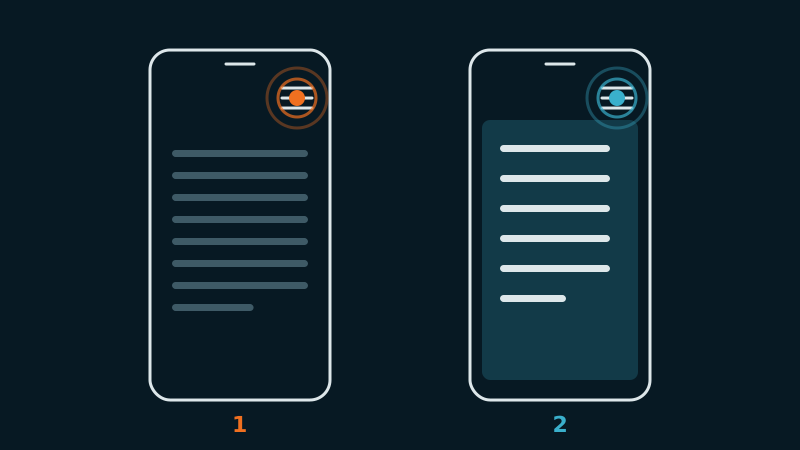
You tap the burger: nothing. You tap again: the menu opens. Every single time, it takes two taps. It is neither random nor a theme bug: it is the mechanical behavior of the “JavaScript delay”, a very common optimization. Here is why, and the two ways to fix it.
What the “JavaScript delay” does (and why the first click is lost)
To gain performance points, the “JS delay” (or “load on interaction”) postpones script execution until the visitor does something: a scroll, a mouse move, or a first tap. As long as nobody moves, no JavaScript runs, and the initial score climbs.
The problem is obvious once you think about it: the very first tap on the burger IS that first interaction. So that tap does not open the menu, it triggers the loading of the scripts. By the time they arrive and attach to the button, your finger is already gone. The menu only opens on the second tap, when the script is finally there and listening.
Tap 1 → nothing
The tap is “consumed” to launch the script loading, not to open the menu.
Tap 2 → the menu opens
The scripts have finally loaded and the handler is now listening on the button.
It is even more visible with a timer variant: if the scripts load “after 3 seconds”, a visitor who taps before is faced with a dead burger.
Confirm it is really that (30 seconds)
Three simple checks:
- The symptom is constant, not intermittent: it is always two taps. A real bug would be more erratic.
- DevTools Network tab: reload, touch nothing, and watch. The menu scripts (often jQuery + the theme script) only download after your first interaction. That is the signature of the delay.
- Elimination test: temporarily disable the JS delay. If the burger responds on the first tap, the culprit is identified.
Solution A: isolate the menu AND its dependencies
The natural reaction is to exclude the menu script from the delay. That is necessary, but often not enough, and this is where most people get stuck.
A theme menu almost never works alone: it depends on other scripts, typically jQuery (and sometimes jQuery Migrate, or the theme core). If you exclude the menu script but leave jQuery in the delay, the menu script runs while jQuery does not exist yet: it fails silently or attaches to nothing. Result: the menu stays broken, and you do not understand why, since “the menu is excluded”.
So you must exclude the whole chain: jQuery → (jQuery Migrate) → the menu script. Together.
Two concrete traps when declaring these exclusions:
- Target by a unique piece of the file URL (for example
jquery.min.jsor the theme script name), not by its internal “handle”: depending on the tool, the technical suffix can be stripped and the exclusion misses its target. - Keep a guard on the document state: the excluded script must tolerate running early (check the DOM is ready before attaching to the button).
The trade-off to accept: by taking jQuery and the menu out of the delay, you reload part of the JavaScript early, so you lose some of the performance gain. It is acceptable if you want to keep the theme menu as is, but it is not free.
Solution B (the best case): a vanilla menu, no dependency
The real lasting solution, especially on a heavy theme (Divi, for example, where it is the menu that forces jQuery), is to stop making the menu depend on jQuery at all.
A burger menu, at heart, is trivial: a button that toggles a class on the navigation. A few lines of native JavaScript are enough, with no dependency:
<button class="nav-toggle" aria-expanded="false" aria-controls="site-nav">Menu</button>
<nav id="site-nav" class="site-nav"><!-- links --></nav>

<script>
  const btn = document.querySelector('.nav-toggle');
  const nav = document.getElementById('site-nav');
  btn.addEventListener('click', function () {
    const open = nav.classList.toggle('is-open');
    btn.setAttribute('aria-expanded', open);
  });
</script>
Because this script is tiny and dependency-free, two options open up:
- you inline it as is, not deferred, in the theme: the burger responds on the first tap, always;
- and you can then defer absolutely everything else in your JavaScript with peace of mind, since the only critical interaction (opening the menu) no longer depends on anything.
A non-negligible bonus: on many themes, the menu is the only reason jQuery loads with priority. A vanilla menu can therefore let you take jQuery out of the critical path entirely. It is the best of both worlds: an instant menu and lighter JavaScript.
The burger is the most visible case of a wider family: forms, sliders, cookie banners and analytics break under a JavaScript delay for the same reasons. The complete method shows how to find the script at fault in each case, and our guide on monolithic theme scripts explains why the menu sometimes cannot be isolated at all.
With Mantys Core
Mantys Core handles both routes precisely. For solution A, its delay exceptions are declared by a URL fragment (not the fragile handle) and account for the dependency chain, with the document-state guard that makes the exclusion actually hold instead of failing silently.
And for solution B, the “self-sufficient, non-deferred block” approach is native: a vanilla menu can be served out of the delay while all the rest of the JavaScript is postponed, without you juggling between score and feature.
In other words: whether you keep the theme menu or move to vanilla, the burger responds on the first tap, without sacrificing the slimming of the rest.
In summary
- The “mandatory second click” comes from the JS delay: the first tap wakes the script loading instead of opening the menu.
- Confirm it by observing that the scripts only load after the first interaction (or by disabling the delay).
- Solution A: exclude from the delay the menu AND its dependencies (jQuery included), targeting by URL, with a state guard. It works, but it costs part of the gain.
- Solution B (the best case): a vanilla menu with no dependency, inlined non-deferred, that responds on the first tap and lets you defer all the rest, jQuery included.
Comments
Stuck on a similar problem? Describe your setup and what you see. We read every comment and answer.
No comments yet. Be the first to share your case.