 Mantys Core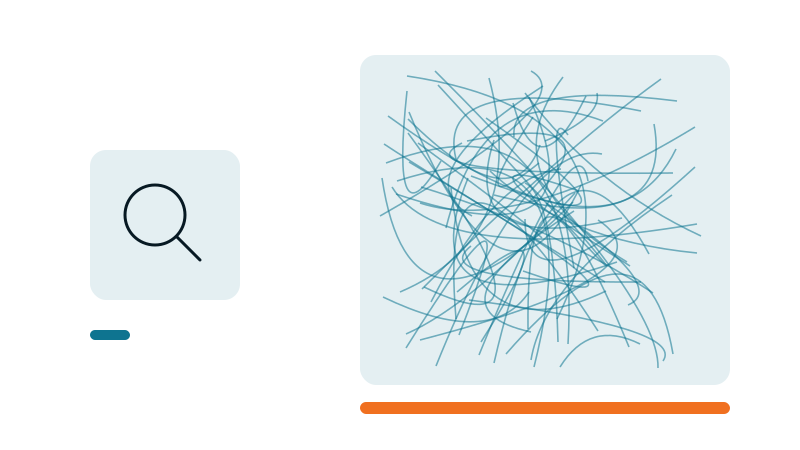
You were told SVG is light and razor sharp, so you drop it everywhere and paste the code straight into the page. That instinct is right, for a search magnifier or a small arrow. It turns into a performance trap the moment the image gets complex, and into a real mistake when what you pasted is not even a true vector.
By the end of this guide you will be able to look at any block of SVG code and say, at a glance: that one is fine inline, that one belongs in an external file, or that one is not even an SVG. That single reflex saves pages from doubling in weight for no reason.
What "inline SVG" actually means
There are two ways to put an image on a page. First, an image tag that points to a file, like <img src="logo.svg">. The browser reads the tag, then goes and fetches the file separately. Second, an inline SVG: the drawing is written out in full, inside the page code itself, every stroke becoming a line of code.
An analogy. An image tag is a note that says "the photo is in the drawer". An inline SVG is copying the entire recipe of the photo, stroke by stroke, right in the middle of your text.
So "inline" is neither good nor bad on its own. Everything depends on the size of the recipe.
Why a small icon inline is exactly right
The legitimate case: a search magnifier, an arrow, a checkmark, a small pictogram. A few strokes, a handful of nodes. Inline shines here.
- Zero extra network request. No round trip to fetch a 300 byte file, the drawing is already there.
- Stylable in CSS. Change the color on hover with
currentColor, animate it, all for free. - Visible from the very first paint, nothing to wait for.
Rule of thumb: an optimized inline icon under about 4 KB stays healthy. Past that, start thinking about a file.
The tipping point, when inline turns into a problem
This is the heart of it. Three hidden costs pile up the moment the drawing stops being a simple icon and becomes a full illustration.
1. The DOM explodes
The DOM (Document Object Model) is the list of every element the browser has to hold in memory and recompute on every interaction. Think of it as the running inventory of the page.
A simple icon adds a few nodes. A detailed illustration exported from a design tool is hundreds of paths, so hundreds of nodes, for a single image. A measurement tool like Lighthouse warns beyond roughly 800 elements in the page and treats it as excessive beyond about 1,400. One badly placed illustration can add 300 nodes on its own, a large slice of the budget, for nothing.
The bigger the DOM, the slower every style and layout recalculation, the more scroll and clicks stutter. That hits interactivity directly, the INP metric (Interaction to Next Paint, how fast the page reacts to a click or a tap).
2. The parse time climbs
Before it can show anything, the browser has to read and interpret each stroke of the inline SVG. Multiplied by hundreds of paths, that delays the first paint.
And this cost is paid on the main thread, the same one that answers clicks. So it is felt everywhere, not just at load.
3. Zero cache, reloaded on every page
An inline SVG lives inside the page code. It is not cached on its own. If it appears on five pages, it is re-downloaded and re-parsed five times. An external .svg file, by contrast, is downloaded once, then served from cache on every other page. It does not block rendering, and it can be loaded lazily when it sits lower down.
The analogy: copying the same full recipe into every chapter of a book, instead of a single bookmark pointing to one appendix.
The trap inside the trap, a raster disguised as SVG
The worst case, and a surprisingly common one: a PNG or JPG encoded in base64, pasted inside an SVG tag. From the outside it reads as "an SVG". In reality it is a compressed photo turned into text.
Why it is the worst of both worlds
Base64 inflates the weight by about 33 percent. Three bytes become four characters.
It is not cached independently, so it reloads on every page it appears on.
The browser has to decode that wall of text before it can display anything.
It is downloaded whether it is on screen or not. No lazy loading is possible.
The tell: if the "SVG" weighs hundreds of kilobytes and contains a long string like data:image/png;base64,iVBOR..., it is not an SVG. It is a raster image in the wrong drawer.
<svg width="1200" height="800" ...>
  <image href="data:image/png;base64,iVBORw0KGgoAAAANSUhEUg...
     ...tens of thousands of characters of encoded photo...
     ...kSuQmCC" width="1200" height="800"/>
</svg>
The fix: re-export a real image file, ideally WebP (a modern image format, lighter than JPEG or PNG), in a plain image tag, with width and height set, lazy loading if it is off screen, and responsive versions. Those versions only pay off with a correct sizes attribute: see our srcset and sizes guide.
A real case, anonymized
We audited one page of a site (a Divi build). Nothing looked wrong in the editor, it "just had a couple of images" near the bottom.
The fix: the pictogram as an external .svg file (or a WebP at its real size), the podcast visual as WebP in an image tag. Expected page: around 400 KB, half the code to download and parse. The point is that this is exactly the kind of drift an automated audit surfaces, while to the eye, in the editor, "it just looks like an image".
The decision rule, the part to save
One question, three answers.
- Is it a photo, a screenshot, a realistic render? Not a job for SVG. Image tag in WebP, responsive, lazy if off screen.
- Is it vector, but large or complex (a big illustration, many paths, over ~4 KB once optimized)? An external
.svgfile, referenced by an image tag, preloaded if it is important and visible early. - Is it a small icon, few nodes, that you want to color or animate in CSS? Inline is perfect.
When in doubt, externalize. You lose almost nothing, and you gain the cache plus a light DOM.
Reads as healthy
A few strokes, a handful of nodes, under 4 KB, colored or animated with CSS. Inline it and move on.
Reads as a leak
Hundreds of paths, tens or hundreds of KB inline, or a data:image/png;base64 string inside. External file, or WebP in an image tag.
The bottom line
An SVG is not good or bad. What counts is the right format in the right place. The same three letters can be a feather or an anvil depending on what sits inside.
The diagnostic reflex: look at the weight of the block and the number of paths, not just how it looks. A logo that renders crisp on screen can still be a 300 KB raster in disguise.
Opening the code of every page to weigh each SVG does not scale. Mantys Core watches for this kind of leak across the whole site:
It flags heavy inline SVG and raster images disguised as vector, the drift that looks innocent in the editor.
It converts eligible images to WebP, sets their dimensions, and lazy loads what sits off screen.
It keeps the above-the-fold minimal and defers the rest, so a stray illustration low on the page never taxes the first paint.
You keep the discernment. The platform does the page-by-page hunting, so you do not have to open the code file by file.
Comments
Stuck on a similar problem? Describe your setup and what you see. We read every comment and answer.
No comments yet. Be the first to share your case.