 Mantys Core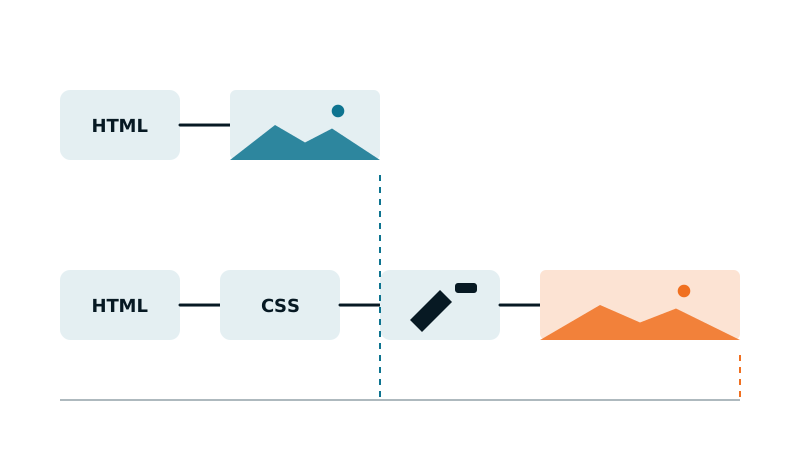
Your hero is a full-width section with a background image, set in Divi, Elementor or another builder. PageSpeed names that section as the Largest Contentful Paint element, and lists “LCP request discovery” among its warnings. You already compressed the image. It is still slow.
The weight is rarely the main problem. The problem is when the browser learns that the image exists.
Why a background image starts late
A regular <img> is in the HTML: the browser spots it in the first bytes and can request it immediately. A background image lives in the CSS. The browser only finds it after four steps:
- download the HTML;
- download the stylesheet that contains the rule, often a per-page file generated by the builder;
- apply the styles and match the rule to the section;
- only then, request the image.
Two builder habits make it worse. The background often has no size variants: one 1920 pixel file for every screen, phones included. And many themes and plugins lazy load backgrounds with a script that adds the image once the section is in view. If that script is itself delayed until the first interaction, the hero waits for the visitor to move.
Confirm it on your page
- In DevTools, inspect the hero section and look for
background-imagein the computed styles. Note the file URL. - In the Network panel, with mobile emulation, reload and find that file: see how late it starts compared to the HTML and the stylesheets.
- Check the section’s classes and attributes for a lazy loading marker, often a class like
lazyloador an attribute likedata-bg.
Fix A (best): turn the hero into a real image
Put an <img> inside the section, positioned to cover it. It looks the same, and the browser now sees it in the HTML, can choose a width from srcset, and can give it high priority:
<section class="hero">
  <img class="hero__bg" src="/uploads/hero-1920.webp"
       srcset="/uploads/hero-768.webp 768w, /uploads/hero-1920.webp 1920w"
       sizes="100vw" width="1920" height="900" alt="" fetchpriority="high">
  <div class="hero__content"><!-- title, button --></div>
</section>

<style>
  .hero { position: relative; }
  .hero__bg { position: absolute; inset: 0; width: 100%; height: 100%; object-fit: cover; z-index: -1; }
</style>
In most builders this is an image module placed in the section with the same CSS, or a custom HTML block. The empty alt keeps it decorative, as the background was.
Fix B: keep the background, but make it early
If the design has to stay a background:
- Preload it, with one preload per device if the builder uses a different background on mobile. The method is in our guide on the LCP image per device.
- Take the hero out of any background lazy loading: in the builder settings, the plugin that adds it, or by excluding that section.
- Give phones a smaller file: both Divi and Elementor let you set a different background image per device. Upload a mobile-sized version there.
- Put the hero’s rule in the critical CSS, so it applies at first paint instead of waiting for the full stylesheet.
Hero that starts early
A real image with srcset and high priority, or a preloaded background, not lazy loaded, with a mobile-sized file.
Hero that starts late
A 1920 pixel background, lazy loaded by a script, itself delayed until the first interaction.
Check the result
- Network panel, mobile emulation: the hero image starts right after the HTML, not after the stylesheets.
- Its size matches the device.
- It appears without moving the mouse or scrolling.
With Mantys Core
Mantys Core can run your whole performance layer, cache included, or sit next to the setup you already have. On a background hero it handles the discovery problem:
It detects, from real renders on mobile and desktop, when the LCP of a page is a CSS background, and preloads that image for that device.
The critical CSS of each page contains the rules of what is visible at load, so the hero is styled at first paint instead of waiting for the full stylesheet.
The file itself stays your job: a background has one image for every screen, so the mobile weight is solved by a real image (fix A) or by a per-device background in your builder.
In summary
- A background image is discovered late: HTML, then CSS, then style matching, then the image.
- It has no srcset, and builders often lazy load it with a script.
- Best fix: a real image covering the section, with srcset and high priority.
- Otherwise: preload per device, no lazy loading on the hero, a mobile-sized file, and its rule in the critical CSS.
Comments
Stuck on a similar problem? Describe your setup and what you see. We read every comment and answer.
No comments yet. Be the first to share your case.